


Key takeaways
- Sales integrations succeed or fail based on how data flow and error handling are designed, not just which APIs are connected
- Salesforce, HubSpot, and Zapier each define specific patterns for authentication, rate limits, and retries that teams must respect
- A clear system-of-record strategy prevents duplicate or conflicting sales data across CRM, voice, and automation layers
- Simulated testing before production deployment catches integration failures before they reach live sales conversations
- A practical decision checklist helps revenue operations teams evaluate integration readiness before go-live
Why sales integrations break more often than they succeed
Sales teams rarely fail because a single tool is bad; they fail because data moves between tools without a clear owner for what happens when something goes wrong. A lead captured by a voice agent, pushed to a CRM, and then routed through an automation platform touches at least three systems, each with its own authentication model, rate limits, and error behavior. When teams treat integrations as a one-time setup rather than an ongoing operational responsibility, failures accumulate quietly: duplicate contact records, missed follow-ups, and call outcomes that never make it into the CRM. The Salesforce REST API documentation is explicit about this responsibility split—developers are expected to handle authentication tokens, respect governor limits, and structure requests according to defined object models rather than assume the API will silently accommodate malformed or excessive traffic. The same discipline applies to HubSpot’s API, which documents specific endpoints and data structures that integrations must conform to rather than treating the CRM as a generic data dump. Revenue operations teams that skip this groundwork end up debugging integration failures in production, often after a customer has already had a bad experience. The fix isn’t more tools—it’s a clearer map of where data flows, what format it takes at each hop, and who is accountable when a step fails. Learn more about Persistence. Source: reference. Source: reference. Source: reference.Designing data flow before connecting any tool
A sound integration strategy starts with a diagram, not a subscription. Before connecting a voice agent, CRM, and automation platform, revenue operations teams should map exactly which system is the system of record for each data type—contact info, call transcripts, deal stage—and which systems are read-only consumers of that data. Salesforce’s REST API guide describes structured objects and relationships that assume a single authoritative source for each record; when two systems both believe they own a field, conflicts are inevitable. HubSpot’s API documentation similarly organizes data around defined objects (contacts, deals, tickets) that expect one source of truth per property. Persistence’s platform reflects this pattern directly: it supports visual or prompt-based agent building along with defined knowledge sources and actions, meaning a voice agent’s write-backs to a CRM are treated as explicit, structured actions rather than freeform data dumps. Teams building sales workflows should decide, before any integration is wired up, exactly which fields a voice agent, form, or automation tool is allowed to write, and route everything else through read access only. This single decision prevents the majority of downstream sync conflicts that revenue operations teams spend hours untangling later.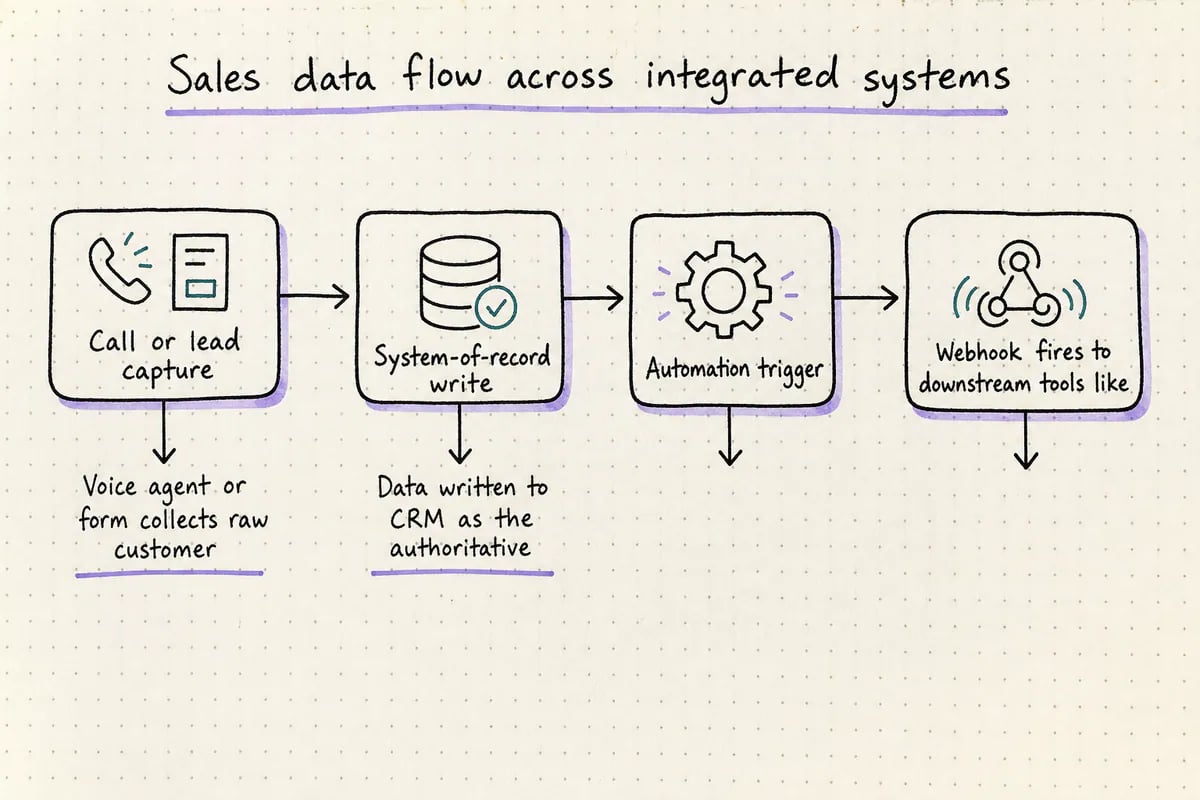
Mapping where sales data originates, where it's authoritative, and where failures must be caught.
Failure handling: retries, webhooks, and silent data loss
Most sales integration failures aren’t dramatic outages—they’re quiet, partial failures that leave a CRM slightly out of sync with reality. Zapier’s webhook documentation describes how event-driven automation depends on webhooks firing reliably and being acknowledged; if a receiving system doesn’t respond correctly, the triggering event can be lost or retried in ways that create duplicate actions downstream. This is a critical detail for sales teams: a webhook that fires twice because of a timeout can create two deals, two follow-up tasks, or two calendar invites for the same customer. Salesforce’s REST API guide likewise emphasizes structured request and response handling, which implies that any integration built against it needs explicit logic for what happens on a failed or delayed response, not just the happy path. Persistence’s approach to this problem is to provide simulated-call testing before deployment and operational monitoring afterward, so failure modes in voice-to-CRM data flow are caught before they reach live callers. Revenue operations teams building their own integrations should apply the same standard: never assume a webhook or API call succeeded without confirmation, and always define what the system does when it doesn’t—queue for retry, alert a human, or explicitly discard with a logged reason.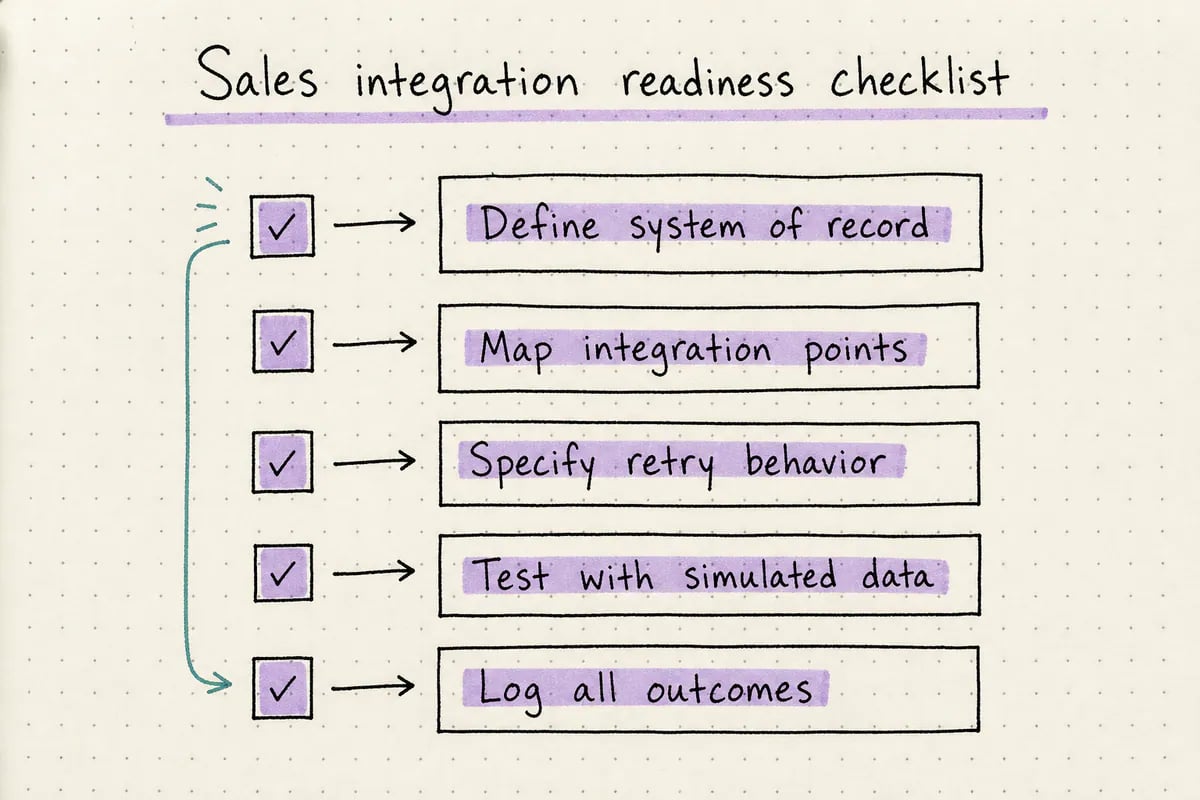
A pre-deployment checklist for revenue operations teams adding new integrations.
Keeping one system of record as integrations multiply
As sales stacks grow—CRM, voice agent, scheduling tool, payment processor—the temptation is to let each new integration write wherever it’s convenient. This is how systems of record quietly become systems of confusion. The safer pattern, supported by how both Salesforce and HubSpot structure their APIs around defined objects and ownership, is to keep one platform authoritative for each category of data and treat every other connected tool as either a trigger source or a downstream consumer. Persistence’s publicly listed integrations—including Salesforce, HubSpot, Zendesk, Calendly, Zapier, Twilio, Stripe, and Shopify—illustrate the breadth of systems a voice agent might touch in a single sales workflow, from taking a call to updating a CRM to scheduling a follow-up. Each of those connections needs the same question answered: does this integration write new truth, or does it just react to truth that already exists elsewhere? Revenue operations teams that answer this clearly, tool by tool, avoid the slow accumulation of duplicate contacts and conflicting deal stages that eventually erodes trust in the CRM itself. Persistence’s agent building and integrations documentation describes how actions and knowledge sources are configured explicitly, which supports this same discipline at the voice-agent layer specifically.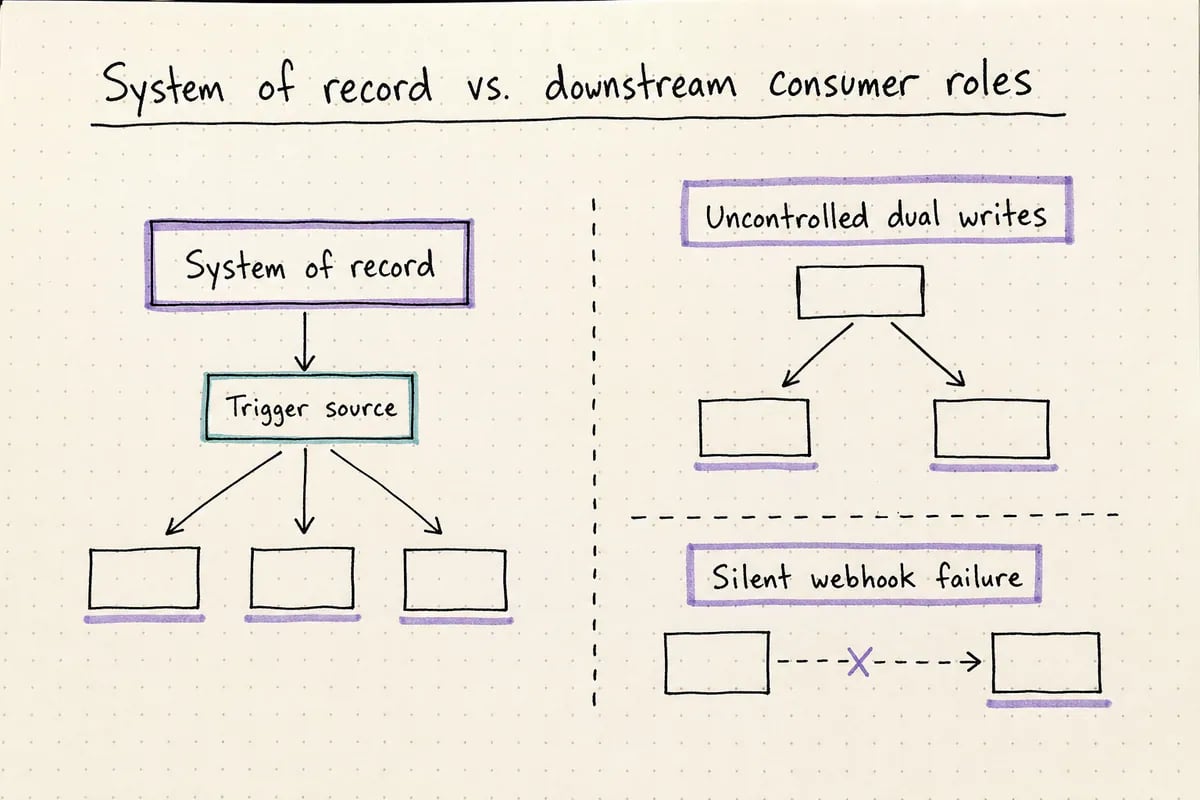
Assigning ownership prevents duplicate or conflicting sales records.
Related resources
Continue exploring with Explore Persistence solutions.Frequently asked questions
What causes most sales integration failures?
What causes most sales integration failures?
Most failures come from unclear ownership of data—two systems both trying to write the same field—or from unhandled webhook and API failures that silently drop or duplicate records, as described in Zapier’s and Salesforce’s official documentation.
How does Persistence handle integration failures in voice sales agents?
How does Persistence handle integration failures in voice sales agents?
Persistence provides simulated-call testing before deployment and operational monitoring after deployment, which helps catch data flow and integration failures before they affect live sales conversations.
Should a voice agent be allowed to write directly to a CRM?
Should a voice agent be allowed to write directly to a CRM?
Yes, but only to explicitly defined fields. Persistence’s agent building supports defined actions and knowledge sources, which keeps voice-agent writes structured rather than freeform, reducing the risk of conflicting CRM data.
What is a system of record in a sales integration context?
What is a system of record in a sales integration context?
It’s the single platform designated as the authoritative source for a given data field, such as a CRM owning deal stage, so that other connected tools read or trigger from it rather than overwriting it independently.
Try Persistence
Build reliable voice AI with Persistence
Design, test, and deploy production-ready voice agents.